If you only need Facebook and Instagram, try Meta Business Suite first. For a simple queue across several networks, compare Buffer and Publer. If you need a view organized by brand and reporting, include Metricool. For a visual content operation, compare Later; for organizing reusable content, SocialBee; for work involving more coordination and community management, evaluate Hootsuite.
The best purchase depends on what consumes your time: preparing content, adapting it, requesting approval, scheduling, responding or collecting results. A tool that handles one of those tasks very well may leave another in your hands.
Prices and limits checked on October 18, 2026. We retain original currencies and distinguish annual billing, monthly billing and temporary trials. Prices do not represent the total cost of content production or necessarily include taxes and add-ons.

What to automate to make the work lighter
Choose the stage before comparing applications:
Open the detailed decision table
| Stage | Useful result | What still needs an owner |
|---|---|---|
| Preparation | Organized ideas and drafts | Topic relevance and sources |
| Adaptation | A suitable version for each network | Accuracy, context and voice |
| Approval | A recorded decision on the final piece | Who can authorize changes and publication |
| Scheduling | Correct date, channel and file | Exceptions and schedule changes |
| Publication | Confirmation that the piece went live | Failures, duplicates and corrections |
| Conversation | Classified messages and prepared replies | Sensitive cases and those requiring judgment |
| Measurement | Comparable results and identifiable links | Interpretation and the next decision |
Scheduling more posts does not demonstrate better results. Automation has value when it reduces work or errors without making the audience’s experience worse.
Quick comparison of free and paid options
Compare options, free limits and costs
| Tool | What you can try free | Paid reference | Unit that can change your bill |
|---|---|---|---|
| Meta Business Suite | Native Facebook and Instagram management with planning features | No scheduling subscription required; advertising is a separate expense | Production and operations, rather than a seat in this tool |
| Buffer | Three channels; ten queued posts per channel; one user | Essentials: USD 5/channel/month billed annually | Channels; Team adds collaboration at a different rate |
| Metricool | One brand, twenty posts/month; excludes LinkedIn and X on Free | Starter from EUR 16/month billed annually in the offer reviewed | Brands, plan and add-ons |
| Publer | Three accounts excluding X; ten pending posts per account | Professional from USD 5/month with one account and one user | Additional accounts and members |
| Later | Temporary trial; we do not treat it as a permanent free plan | Starter: USD 18.75/month billed annually in the offer reviewed | Social Sets, users, posts and extras depending on plan |
| SocialBee | Temporary trial | Bootstrap: USD 29/month or USD 290/year | Profiles, workspaces, users and add-ons |
| Hootsuite | Fourteen-day temporary trial | Paid plans; confirm local rates and seats in the configurator | Users, plan, accounts and features |
Sources: Meta Business Suite, Buffer, Metricool, Publer plans, Publer pricing explanation, Later, SocialBee and Hootsuite.
A queue is not a monthly allowance. In Buffer and Publer, publishing a piece frees space in that free queue. Metricool’s Free limit is monthly. Also distinguish “three accounts” from “three brands”: a Facebook page and an Instagram account may occupy two connections.
Hootsuite’s numerical rate was not sufficiently clear on the page reviewed to state it here with an unambiguous billing period. We therefore describe how to confirm the purchase rather than copying a figure from another region or an old review.
How we chose these seven
The selection covers the native tool, straightforward schedulers and platforms with more organizational features. We reviewed official documentation and pricing; we did not run a comparative trial of reach, engagement or publishing reliability. The examples are proposed workflows, not customer case studies.
The decision rests on five questions: networks and formats you need, review process, organization by brand, total cost and the ability to detect failures. Verify advertised features with your account type and format; capabilities can vary between networks.
We did not add tools simply because they generate text. Writing a draft is one stage. Having a piece approved, adapted and published is another.
Meta Business Suitethe first trial for Facebook and InstagramFree native tool
1. Meta Business Suite: the first trial for Facebook and Instagram
Meta’s tool lets you manage content on its platforms and plan posts. It is an initial alternative if your operation is concentrated there and you do not need a calendar covering other networks. Meta Business Suite overview and official scheduling demonstration.
Work it can take off your plate: logging in to publish each piece separately when you already know the content and date.
Proposed example: a business prepares the week’s updates, adapts the Facebook and Instagram versions, then schedules them after review. It subsequently checks the live posts and responds to the audience.
A useful first trial: one piece in each format you actually use. Verify connections, time zone, cover image, crop, link and whether the content requires any manual step. You do not need another platform’s subscription to discover that the native tool covers your calendar.
When to choose another option: when the work requires LinkedIn, other networks, more separation between brands or an approval process your configuration cannot handle well.
What not to expect: scheduling does not replace editorial work. A scheduled piece still needs review if an offer, price or circumstance changes.
Buffera straightforward queue for several networksFree plan · paid options
2. Buffer: a straightforward queue for several networks
Buffer Free lets you connect up to three channels and maintain ten scheduled posts per channel. Essentials is advertised at USD 5 per channel per month billed annually; Team includes users and approval workflows at a different rate. Buffer plans and features.
Who we would try it for: a person publishing on several networks who needs a scheduling routine that is easy to maintain.
Proposed example: save ideas during the week, prepare versions for each channel and fill a short queue of approved content. The useful result is the next batch ready to go, with a clear record of which piece belongs on each network.
What to try free: the most demanding content in your calendar, rather than only a text post. Check the format, link and final published version. Also save one piece as a draft to see whether the review process fits the workflow.
When to pay: when queue size, channel count or necessary features justify the upgrade. For three channels, the reviewed annual Essentials rate works out at USD 15/month and USD 180/year before taxes. That figure represents one configuration, rather than a price for every team.
When to rule it out: if your main need is managing many brands with different organizational requirements or more complex customer service. Compare that specific task before expanding your subscription.
Metricoolfor organizing work around brands and reportsFree plan · paid options
3. Metricool: for organizing work around brands and reports
Metricool Free allows one brand and twenty posts per month, with exclusions including LinkedIn and X. Higher plans increase capacity; Advanced includes team and client management and approvals. Check add-ons: a feature’s presence in the platform does not mean Starter includes it. Metricool’s official comparison.
Who we would try it for: someone who needs to bring planning and results review together by brand.
Proposed example: prepare a company’s calendar, identify pieces with campaign links and review which attracted attention and generated visits at the end of the period. That review can inform changes to topics or formats without reducing the analysis to “we published more.”
What to try free: a sample within the monthly limit and a review of the report you will need to deliver. Ask whether it supports a specific decision: continue a format, adjust frequency or review the link destination.
When to pay: when you need excluded networks, more brands, history or a specific coordination feature. Check which tier includes it; do not assume the first paid plan provides approvals.
When to choose another option: if Free excludes your primary network and you only need a small queue another tool already offers at no cost. A brand publishing a few posts does not need to buy based on the maximum number of brands advertised.
Publerfrom a small queue to more organized schedulingFree plan · paid options
4. Publer: from a small queue to more organized scheduling
Publer Free offers three accounts, excluding X, and ten scheduled posts at a time per account. Professional expands scheduling and adds features such as RSS; Business includes further analytics, automation and approval capabilities. Its API is not universally available to the public: access depends on eligibility and plan. Official plan explanation.
Who we would try it for: a professional organizing posts with a configuration tailored to their accounts.
Proposed example: start with approved articles, prepare a selection of pieces for each network and schedule them after checking that they remain current. If you use RSS, begin by preparing content for review. Automating the input does not require publishing everything.
What to try free: a week’s work, adaptation for each network and subsequent access to publishing history. Its advertised free history is short; check whether you need to retain evidence outside the platform.
When to pay: when scheduling, members or higher-tier features remove an observed limitation. Professional’s starting rate for one account does not represent the cost of managing multiple brands with a team.
When to rule it out: if the project depends on an API or integration your plan does not permit. Establish that dependency before building the rest of the workflow.
A queue is not a monthly quota
The workflow: compare pending capacity with usage per period. Buffer Free allows ten queued posts per channel; Metricool Free allows twenty posts per month for one brand. Do not turn those limits into a single measure of “free posts.”

Buffer also limits the plan to three channels and one user. In Metricool, check the networks: Free excludes LinkedIn and X. The plan table and its sources retain these conditions next to each option.
Laterfor planning a visual content operationTrial · paid plans
5. Later: for planning a visual content operation
Later organizes its plans through Social Sets and limits per profile. The reviewed Starter offer includes one set with one profile per supported network, one user and a post limit per profile; higher plans change capacity. Do not confuse its trial with a permanent free subscription. Later plans.
Who we would try it for: a team or professional whose work depends on reviewing the visual sequence and adaptation of content assets.
Proposed example: a brand prepares a batch of videos and photographs, reviews continuity across its calendar and schedules approved versions. The calendar helps show what is missing: a cover, a description or a piece for another channel.
What to check: how a Social Set is counted in your actual configuration. If you need two profiles on the same network, a set “covering several networks” does not necessarily include both in the entry tier.
When to pay: when this visual organization and the plan’s capacity solve your operational needs. If more people need to approve or produce content, verify the available seats and features.
When to choose another option: if you only schedule a few text posts and do not use what distinguishes this workflow. A visual calendar is not a requirement for every strategy.
SocialBeefor reusing content thoughtfullyTrial · paid plans
6. SocialBee: for reusing content thoughtfully
SocialBee offers planning and publishing, category-based organization and content reuse features. The reviewed Bootstrap rate is USD 29 monthly or USD 290 annually; check profiles, users and terms before choosing a tier. SocialBee product and pricing.
Who we would try it for: an operation with lasting content that needs to maintain an editorial rhythm without rebuilding the selection from scratch every week.
Proposed example: separate tutorials, frequently asked questions and updates. Tutorials can be proposed again after review; a dated update leaves the reuse cycle when it stops being current.
What to check during the trial: rules for repeating a piece, expiry dates and what happens when a category runs out of valid content. Keep a review step for prices, figures and conditions.
When to pay: when classification and reuse reduce actual editorial work. Compare the cost with the time spent maintaining that library, including review.
When to rule it out: if most of your content changes quickly or you do not yet have a library worth reusing. Repeating irrelevant material does not solve the lack of a useful idea.
Hootsuitefor work requiring more coordination and community managementTrial · paid plans
7. Hootsuite: for work requiring more coordination and community management
Hootsuite brings together planning, publishing, an inbox and analytics or listening features depending on the plan. The offer reviewed distinguishes Standard, Professional and Advanced, with different capacity and coordination features. Some functions require multiple seats. Hootsuite’s official comparison.
Who we would evaluate it for: an organization coordinating publishing and audience responses across people, with a need for clear permissions and procedures.
Proposed example: the editorial team prepares a piece, another person approves it and the community manager responds with the appropriate context. That complete route is the buying requirement, rather than simply connecting many accounts.
What to try: an approval, a last-minute correction, a publishing failure and a conversation that needs to pass to someone else. Evaluate whether users understand their next action.
When to pay: when the selected plan and seats cover the operation and their cost stands up to comparison with simpler alternatives.
When to rule it out: if one person only needs to schedule a few pieces. The breadth of a suite can become setup work that never pays back.
Calculate the price using your actual configuration
Before comparing headline rates, write down:
- Number of brands and profiles per network.
- People who create, approve, publish and respond.
- Formats and monthly volume per profile.
- History, reports and connections you need.
- Network, AI, analytics or API add-ons.
- Time needed to adapt pieces, handle incidents and switch tools.
Hypothetical example: a company publishes across three networks and one person reviews. A per-channel plan may fit well; an agency with several brands and approvers needs a different calculation. Multiplying the smallest advertised price alone does not determine the answer.
Also check the cost of leaving: can you retain copy, files, dates, links and results? Maintaining your own editorial library can make a later migration easier.
The first week: automate one complete stretch of work
Open the detailed decision table
| Step | Proposed action | Signal that it is complete |
|---|---|---|
| 1 | Choose one brand and its necessary networks | A defined list of profiles and owners |
| 2 | Prepare a small batch of actual content | Files, copy and sources available for review |
| 3 | Adapt and approve | The person responsible knows the final version |
| 4 | Schedule and check | Correct time zone, links, format and files |
| 5 | Confirm publication | The piece appears on the channel without duplicates |
| 6 | Review response and visits | Learning tied to specific pieces |
This is a proposed work plan, not a promise of results in seven days. Keep the volume small so you can review the complete cycle.
What to measure without confusing activity with results
For operations, record time spent scheduling, pieces needing correction and failed or duplicate posts. For content, observe responses to the idea and format. For the business, distinguish visits, inquiries and opportunities using your definitions.
Use consistently tagged links where appropriate and check destinations after publication. Increased clicks can be a useful signal; they do not by themselves demonstrate sales or show that the tool caused the change.
When data is limited, retain qualitative examples: questions received, objections the content addressed and pieces that provided context for a conversation. That information may guide the next piece better than expanding the calendar.
Frequently asked questions
Read the practical answers
Does an external tool reduce reach?
This guide does not present a test establishing a general effect of scheduling tools on reach. Do not base a purchase on universal promises about the algorithm. Check formats, content quality and observed results within their limits.
Can I also automate every reply?
You can organize messages and prepare drafts according to the capabilities available. Define what needs review and how conversations are handed over. Automating classification does not require sending an unchecked reply.
When is a paid plan worthwhile?
When a specific limitation prevents you from completing the work, or a plan reduces a burden you have measured. If a free option already supports your operation, you can keep it and put the budget toward content or audience care.
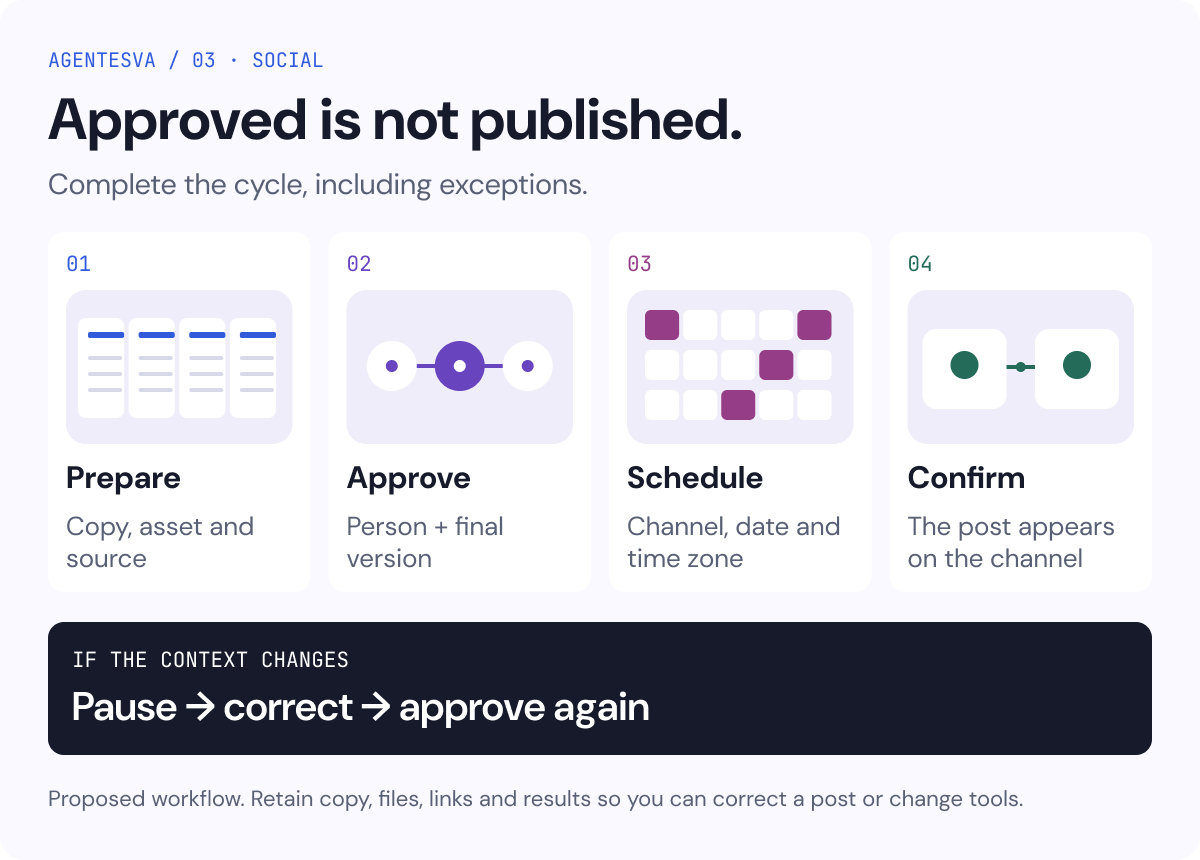
Final infographic: from approved to published
Keep these decisions in mind:
- Prepare: identifiable copy, asset and sources.
- Approve: a person authorizes the final version.
- Schedule: check the channel, date, time zone and files.
- Confirm: verify that the post appears on the network and is not duplicated.
- If the context changes: pause, correct and approve again. For example, if a Thursday offer changes on Wednesday, the procedure should say who corrects it and who checks each channel.
- Retain: keep copy, files, links and results so you can correct a post or change tools. This is a proposed workflow, not a customer result.