Start with the work you repeat, rather than downloading a huge library. For documents, check Claude’s included capabilities first. For your own way of working, consider creating a skill. If you need marketing, design or development help, select a library that fits that discipline. A paid pack earns its place when its preparation and maintenance save work you were actually going to do.
This selection brings together individual skills and packs, identified accordingly. They are not ten equivalent products or a ranking of intelligence. A skill organizes instructions and resources; by itself, it does not change the model or guarantee the quality of the result.
Reviewed: October 18, 2026. We evaluated documentation, repositories and their authors’ pages. We did not purchase the commercial packs or run a comparative performance test. Where the seller is the only source of evidence, we say so.

First, distinguish four different pieces
Open the detailed decision table
| Piece | Purpose | Example decision |
|---|---|---|
| Skill | Teach a reusable procedure through instructions and resources | How to prepare a proposal using your structure |
| Connector or tool | Provide access to a capability or system | Read a table or create a document inside an application |
| Plugin | Bundle capabilities and configuration; it can include skills | Install a collection compatible with your environment |
| Environment and plan | Determine where it runs and which resources are available | Claude on the web, Cowork or Claude Code |
Anthropic’s documentation describes skills as folders of instructions, scripts and resources that Claude loads when relevant. Availability and behavior depend on the environment. What skills are.
A skill for “sending emails” may require a connector, an account and permissions. Buying the file does not provide access to your email or necessarily include API access. That distinction explains why an inexpensive package can require substantial setup.
What free means in this guide
According to the current help documentation, skills are available on Free, Pro, Max, Team and Enterprise with code execution enabled; organizational policies may restrict creation or uploading. Do not confuse that availability with unlimited usage or assume that every version of a feature is available on Free. Creating skills and using them in Claude.
We distinguish these categories:
- Included: the capability is not sold as a separate purchase, within the environment and limits that apply to you.
- Free library: you can obtain the package without paying a license fee; check its specific license and dependencies.
- Paid pack: you pay for files, preparation or other terms stated by the seller.
- External usage: models, media generation, hosting or third-party services that may be billed separately.
The content license and the cost of running it are separate decisions.
Quick comparison: choose a task, rather than the largest collection
Compare options, free limits and costs
| Option | Type | Work we would try it for | Cost of the package or capability | Limit that matters |
|---|---|---|---|---|
| xlsx | Document skill | Spreadsheets with formulas and structure | Claude document capability; publicly available reference source | Check formulas, data types and inputs |
| docx | Document skill | Proposals and editable documents | Claude document capability; publicly available reference source | Confirm content and layout |
| pptx | Document skill | Editable presentations | Claude document capability; publicly available reference source | Review every exported slide |
| Document skill | Extracting, transforming and preparing PDFs | Claude document capability; publicly available reference source | OCR, tables and reading order | |
| skill-creator | Skill for creating skills | Turning your method into a skill | Free public Anthropic example | Needs examples and evaluation |
| frontend-design | Web design skill | Translating a brief into an interface | Free public Anthropic example | Requires review of the actual website |
| Marketing Skills | Community pack | Copy, CRO, SEO and analytics | Free, MIT license | Needs evidence and business context |
| Superpowers | Development pack | Structuring software tasks | Free, MIT license | Adds process; adapt it to the task |
| Creator Skill Pack | Commercial pack | Preparing multimedia production with external tools | USD 39, advertised one-time payment | External APIs and credits cost extra |
| Founder Ops Skill Pack | Commercial pack | Coordinating operations through a technical agent | USD 79, advertised one-time payment | Accounts, permissions and setup are separate |
Sources: Anthropic repository, Marketing Skills, Superpowers and the commercial packs’ creator page. The two paid prices are those advertised by the seller on October 18, 2026, before possible taxes and external usage.
A licensing distinction: Anthropic’s repository separates open examples from the docx, pdf, pptx and xlsx document skills, whose source is available under their own terms. Do not present everything as sharing the same open license. Repository information.
xlsxfor avoiding the same spreadsheet rebuild every weekIncluded capability · plan limits
1. xlsx: for avoiding the same spreadsheet rebuild every week
The xlsx skill focuses on spreadsheets: creation, editing, formulas and data presentation. Its potential value is a file you can use and inspect, rather than an explanation you must copy cell by cell. Official xlsx source.
Example brief: “Using this authorized data, prepare a tracking spreadsheet. Separate inputs from calculations, preserve identifiers and leave formulas for totals. Flag missing information.”
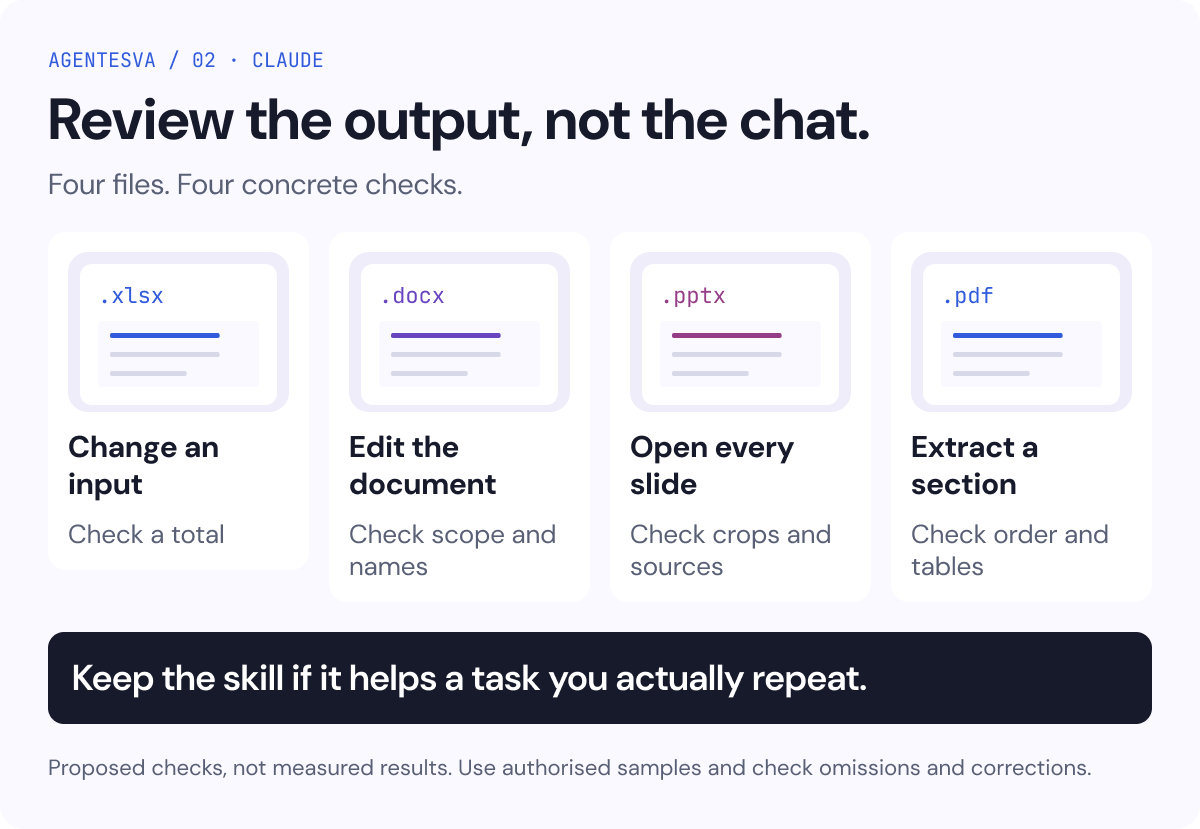
What to review: open the file, change an input and check a total manually. Check dates, currency, duplicates and formulas referencing other sheets. A well-formatted cell can still contain an incorrect calculation.
When it adds little: when a simple table in your existing application handles the work. Do not move a stable process into a generated spreadsheet simply because you can.
docxfor proposals and documents that must remain editableIncluded capability · plan limits
2. docx: for proposals and documents that must remain editable
Use docx to work with Word documents and their structure. We would consider it for producing a consistent draft from a template and approved content. An editable output makes it easier to review scope, responsibilities and terms. Official docx source.
Example brief: “Use this template and these inputs to draft a proposal. Distinguish included scope, exclusions, deliverables and open questions. Do not add customer results or certifications.”
What to review: headings, tables, breaks, numbering, links and alignment with the brief. An incorrect customer name or condition can matter more than the design.
When it is insufficient: when the document requires a specialist decision that nobody has made yet. A skill can organize a contract or proposal; that alone does not validate its terms.
pptxfor turning a narrative into a presentation you can reviewIncluded capability · plan limits
3. pptx: for turning a narrative into a presentation you can review
The pptx skill is designed for creating and modifying presentations. It is a useful starting point if you already have the story, sources and purpose of each slide. Producing the file does not replace those decisions. Official pptx source.
Example brief: “Turn this argument into an editable presentation. Use one conclusion per slide, charts based only on supplied data, sources alongside figures and a final recommendation with its conditions.”
What to review: every slide at its intended viewing size, especially the densest one. Check cropping, overflowing text, contrast and whether each chart preserves its units and denominator.
When to take another route: if you need a very specific visual direction, develop the concept first. Generating more pages from a weak direction only multiplies the corrections.
pdffor extracting and preparing information without losing contextIncluded capability · plan limits
4. pdf: for extracting and preparing information without losing context
The pdf skill brings together procedures for working with PDF files. It can help with extraction and transformation; scanned documents and complex tables require particular care. Official pdf source.
Example brief: “Extract the line items from these documents, retain the source file and page for every row and flag anything unreadable. Do not infer missing amounts.”
What to review: check a sample against the originals, including decimal separators, negative signs, columns and omitted pages. If a figure is illegible, a useful result may be an issue to resolve rather than a filled cell.
When it adds little: if someone else needs to edit the file frequently, it may be better to deliver DOCX or XLSX and export a PDF at the end.
The pack is only part of the system
The workflow: instructions and resources → a compatible environment → accounts and permissions → external usage. Each layer needs a different check; buying one does not automatically activate the others.

For example, a proposal skill needs the sales method, an approved template and rules for unknowns. If it simply says “act as an expert,” much of the work remains undefined. If it also requires sending the document without review, it may introduce an action you do not need.
skill-creatorfor turning your way of working into a procedureFree public example
5. skill-creator: for turning your way of working into a procedure
The skill-creator skill helps create, improve and evaluate skills. Its procedure includes examples and comparisons of results. We would try it when you can already explain a repeated task and recognize a good deliverable. Official skill-creator source.
Proposed example: a skill for preparing a monthly report with your sections, authorized sources and rules for flagging missing data. Supply a good report, another that needed extensive correction and the reasons for the difference.
What to check: run the same kind of task with and without the skill. Count omissions, corrections and review time. Include an incomplete case: the skill should be able to stop and ask for the missing input.
When not to create one: if the task is exceptional or you do not yet know what result you need. A clear brief may be enough.
frontend-designfor giving an interface a concrete directionFree public example
6. frontend-design: for giving an interface a concrete direction
The frontend-design skill is an Anthropic example focused on web interfaces with explicit visual choices. It fits best when you can supply the audience, content, brand and intended use. Official frontend-design source.
Proposed example: “Design a page comparing three services. Keep prices and limits visible, use our typography and avoid animating the main content. It must be readable and usable on mobile.”
What to review: actual content, interactive states, keyboard use, contrast, mobile behavior and loading. A screenshot of the homepage does not establish whether the form or navigation works.
When to rule it out: if you need a small change within an established system and the skill tries to replace that system. Keeping a clear existing component is also a sound design decision.
Marketing Skillsfor structuring marketing workFree · MIT
7. Marketing Skills: for structuring marketing work
Corey Haines’s library includes skills for copywriting, conversion rate optimization (CRO), SEO, analytics and other marketing tasks. It is distributed free under the MIT license. We would treat it as a collection of procedures to select from, rather than a ready-made strategy for every business. Repository and license.
Proposed example: review a landing page with a copy skill and a CRO skill, supplying the offer, audience, sales questions and available data. The expected output is a proposed set of changes tied to those inputs.
What to check: each recommendation should identify a concrete observation, distinguish hypotheses from evidence and preserve the offer’s conditions. A change in copy does not establish an improvement in conversion.
When it adds little: if you have not defined what you sell or to whom. The library may help formulate questions, but it should not invent customers, interviews or results.
Superpowersfor developing software through an explicit processFree · MIT
8. Superpowers: for developing software through an explicit process
Superpowers is a library and development methodology combining skills for planning, implementing and verifying software work. It uses the MIT license. It may fit when a team needs traceability between the problem, the change and its verification. Superpowers repository.
Proposed example: fix a reproducible bug with a test case, implement the correction and record which checks passed. The deliverable should explain both the observed cause and the limits of the solution.
What to check: whether the process improves a real task without imposing steps that add no value. Review its rules for approval and delegation before adopting it across the team.
When to take another route: a simple editorial task may gain more coordination than it needs. A complete software methodology is not the first purchase for someone who only needs to prepare documents.
Creator Skill Packpaying for connected multimedia productionUSD 39 one-off · external usage extra
9. Creator Skill Pack: paying for connected multimedia production
The creator advertises eight skills for a one-time price of USD 39. The package includes procedures and tools for images, video, voice, music and presentations, using services such as Gemini, fal.ai, ElevenLabs and Gamma. External accounts, keys and usage are not included. The offer targets technical environments that support SKILL.md, such as Claude Code. Seller page.
When we would consider it: if you already use several of those services, need to coordinate them through an agent and can maintain the configuration. You are paying for preparation, not unlimited generation access.
Try before expanding: request or review a sample and complete one piece with a limited budget. Check the editable file, credits consumed and what happens if a provider fails.
When not to buy: if you want a setup-free experience in Claude on the web, use only one creative tool or do not yet know what content you produce. Native capabilities or a single application may be enough.
Limit of this recommendation: we verified the public offer, rather than purchasing and testing the delivered code or its results. The seller advertises a single-buyer license for personal or internal use; check the terms before redistributing the package.
Founder Ops Skill Packpaying to coordinate operational toolsUSD 79 one-off · external usage extra
10. Founder Ops Skill Pack: paying to coordinate operational tools
The same creator advertises eighteen skills for USD 79, paid once, covering operations and tools such as GitHub, Linear, Google Workspace, Slack, Notion and financial or cloud services. You need the accounts and configuration for whichever services you choose. Seller page.
When we would consider it: if a technical operator already works across several of those applications and needs to bring information together. You do not have to activate every integration to gain value.
Proposed example: prepare a summary of incidents, code reviews and meetings using read access. Retain human approval for external actions such as sending, signing, modifying or deleting.
What to check: one integration at a time, minimum necessary fields, traceability to the original record and behavior when permission is missing. You should be able to obtain the first useful deliverable without granting write access across the entire operation.
When to rule it out: if the team cannot review the configuration or only needs a summary that one existing tool already provides. Verifying a sales page is not an audit of the purchased package.
When to pay for a skill and when to create your own
A paid pack can reduce preparation if it contains a relevant procedure, examples, documentation and maintenance that you need. A free library may require adaptation. Your own skill may fit a business-specific method better.
The buying question is: what specific work will I stop doing, and what will remain my responsibility?
Open the detailed decision table
| Question for the vendor or repository | Useful signal | Reason to wait |
|---|---|---|
| What task does it cover? | Complete input, output and example | Broad promises without a sample |
| What gets installed? | Explained files, dependencies and permissions | Only a claim of “hundreds of skills” |
| What does it cost to use? | License and consumption separated | “One-time payment” without explaining APIs |
| How is it updated? | Versions and support terms | Ambiguous promises of indefinite maintenance |
| How is it reviewed? | Test cases and visible limitations | Universal guarantees of results |
Avoid paying twice for the same value. If an included feature already solves the problem, a package needs to justify the additional preparation or capability it provides.
How to start without installing everything
- Choose one repeated task and a reference deliverable.
- Check environment compatibility and dependency costs.
- Read the instructions and any scripts before running them.
- Use test data or authorized data and the minimum necessary access.
- Compare the result with your previous way of working.
- Keep the skill if it reduces corrections or adds a useful capability; modify or remove it if it adds friction.
For personal skills in Claude, the help documentation describes uploading a package through Customize → Skills, with code execution enabled. Teams may have their own policies. In Claude Code, follow the installation method documented by the selected repository; do not assume that a ZIP intended for the web includes every dependency of a technical plugin. Using and installing skills in Claude.
Frequently asked questions
Read the practical answers
Does a paid skill make Claude more intelligent?
It does not change the model by itself. It can supply instructions, tools and resources that organize a task better. Evaluate the result of that work using your data and criteria.
Do I need Pro to use any skill?
The current help documentation includes Free among plans with skills, subject to its conditions. That does not make every feature, limit or integration free. Check your specific environment and organizational policies.
How many should I install?
As many as you can justify through a task. There is no universal number. Start with one and keep a list of its purpose, origin, dependencies and last review.
Final infographic: check the deliverable
Keep these decisions in mind:
- XLSX: change an input and check a total by hand.
- DOCX: edit the document and check scope, names and structure.
- PPTX: open every slide; check crops and sources.
- PDF: extract a section and verify order and tables.
- Decision: keep the skill if it helps a task you actually repeat. These checks are proposed, not measured results; use authorized samples and check omissions and corrections.